Speed Calculator Instantly Find Speed, Distance & Time
|

Speed Calculator Instantly Find Speed, Distance & Time

Speed Calculator

Speed Calculator

Calculate speed using distance and time

Inputs
Your Speed
0.00
km/h
Formula Used:
Speed = Distance ÷ Time

Use this distance calculator from speed and time to quickly find the average speed, total distance travelled, and the duration of a trip. It can be used for different types of transportation, including cars, buses, trains, bikes, motorcycles, planes, and more. The calculator also supports various units such as miles, feet, kilometers, meters, and others.

What is speed?

Speed refers to how quickly an object changes its position over a certain period of time. Simply put, it tells us how fast an object covers a particular distance. In the International System of Units (SI), speed is commonly measured in meters per second (m/s). Other widely used units include kilometers per hour (km/h), miles per hour (mph), feet per second (ft/s), and several others.

The appropriate unit depends on the measurement system used in a particular country as well as the object being measured. For instance, using meters per second to describe the movement of a slow snail would be unnecessary and less practical. On the other hand, measuring the speed of a race car in millimeters per second would produce an extremely large number, making calculations more complicated than needed.

The relationship between speed, distance, and time
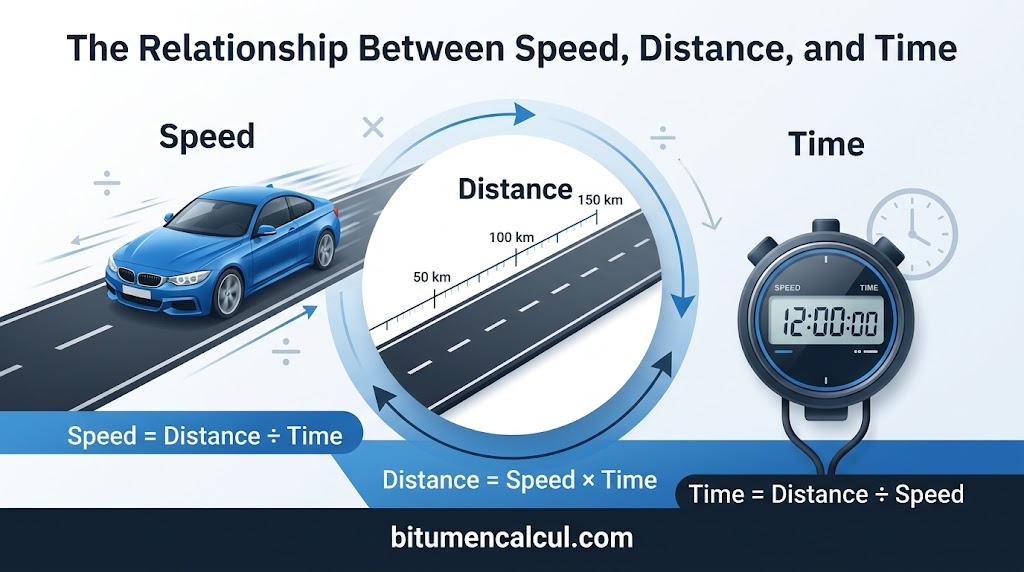
The relationship between speed, distance, and time

Speed, distance, and time are closely connected and can be calculated using the following formula:

speed =distance
time

This formula helps explain that:

  • Speed becomes greater when you travel a longer distance in the same amount of time, or when you cover the same distance in less time.
  • Distance can be worked out when the speed and time are known by using the formula:distance = speed × time
  • Time needed to travel a certain distance can be calculated when you know the speed and distance. The formula is:time =distancespeed

Example:

Suppose you are riding a bicycle at a constant speed of 10 meters per second (m/s) for 1 minute. How much distance will you cover during that time?

First, the time needs to be converted into seconds because the given speed is measured in meters per second. Since 1 minute is equal to 60 seconds, we can now apply the distance formula:

distance =speed × time
=10 m/s × 60 s
=600 m

Therefore, you will travel a total distance of 600 meters in one minute.

Knowing the connection between speed, distance, and time is useful for more than just answering physics questions. These concepts are also relevant in everyday life. For example, they can help you estimate how long a journey to school may take at a particular speed, determine how quickly you need to run during a race, or understand how road speed limits are set with safety in mind.

Common units of speed

Common units of speed

The following table shows some of the common units of speed and their equivalent values in other widely used speed measurements:

m/skm/hmphknft/s
1 meter/second [m/s] =13.62.2369281.943844
1 kilometer/hour [km/h] =0.27777810.6213690.539957
1 mile/hour [mph] =0.447041.6093510.868979
1 knot [kn] =0.5144441.8521.1507751
1 foot/second [ft/s] =0.30481.097280.6818160.592484

Examples of different speeds

To put different speeds into perspective, the table below gives examples ranging from normal human movement to the speed of light:

m/skm/hmph
Average walking speed1.45
Peak human running speed12.4244.7
Peak cheetah running speed33.53120.7
Average orbital speed of the Earth29,783107,218
Average orbital speed of the Sun251,000904,000
Speed of sound in air (sea level, 20°C)3431,235
Speed of light in vacuum299,792,4581,079,252,848

FAQs

To convert from miles per hour to kilometers per hour:

  1. Start with the speed you want to convert.
  2. Multiply the value by 1.6 to get the approximate speed in kilometers per hour.

To convert kilometers per hour to miles per hour:

  1. Take the speed given in kilometers per hour.
  2. Multiply the value by 0.62 to get the approximate speed in miles per hour.

A handy trick if you don’t have a calculator available, such as when you're driving, is to remember the Fibonacci sequence (1, 1, 2, 3, 5, 8…). Use a number from the sequence and the following number gives you an approximate kilometer value when the previous number represents miles. For example, 50 mph is roughly 80 kph.

If you have the average and initial speed, you can calculate the final speed with these simple steps:

  1. Multiply the average speed by 2.
  2. Subtract the initial speed from the result.
  3. You’re left with the final speed.

If you have initial speed, acceleration, and time, use the following method:

  1. Multiply the acceleration by the time.
  2. Add the initial speed to the result.
  3. Revel in your calculation.

Velocity and speed are closely related, but they are not exactly the same. The main difference is that velocity is speed with direction. Speed is considered a scalar quantity, which means it can be represented by a single value that tells us how fast an object is moving. It also represents the magnitude of velocity.

Velocity, on the other hand, is a vector quantity, so it includes both the magnitude and the direction of movement. For example, saying that an object is traveling at 90 mph only describes its speed, while traveling at 90 mph southeast describes its velocity because the direction is also included.

The most economical driving speed varies from one vehicle to another, but it is generally considered to be around 50 mph (80 km/h). However, speed is not the only factor that affects fuel efficiency, and there are several other ways to improve your vehicle's economy.

First, try to maintain a constant speed whenever possible, as steady driving allows the engine to operate more efficiently. If your vehicle has cruise control, using it on flat roads can help maintain a consistent speed. Second, drive at the highest possible gear within the speed limit, as this can also help reduce engine effort and improve fuel economy.

Other useful ways to increase efficiency include turning off AC when it is not needed and keeping as little weight in your car as possible. Reducing unnecessary load can help your vehicle use less fuel during everyday driving.

Google Maps can tell you your speed because it includes an inbuilt speedometer, although this feature is currently available only to Android users. The speedometer is enabled by default, but you can check its status by going to settings → navigation settings and looking under the driving options menu, where you will find the relevant slider.

This feature can be helpful because it will change color if you are exceeding the limit, allowing you to stay aware of your speed without constantly checking the dashboard. Google Maps also lets you report speed cameras and traps, but this option is available only when you are using navigation mode.

To convert a speed given in kph or mph into kilometers or miles per second, you can follow these simple steps:

  1. Start with your current speed, expressed in kph or mph.
  2. Divide the speed by 60 to convert it into kilometers per minute or miles per minute.
  3. Divide the result by 60 once more to get kilometers per second or miles per second.
  4. For a quicker conversion, you can simply divide the original speed by 3600 to convert it directly.

There are several types of speed and related terms that are used to describe how an object moves:

  • Speed — describes how quickly an object is moving from one place to another.
  • Velocity — describes how fast an object moves while also including its direction.
  • Acceleration — refers to how quickly an object's speed changes or how fast it reaches a particular speed.
  • Constant speed — occurs when an object continues moving at the same rate without changing its speed.
  • Variable speed — describes movement where an object's speed changes over time.
  • Average speed — is the total distance covered divided by the amount of time taken to travel that distance.
  • Instantaneous speed — refers to the speed of an object at a specific moment in time.

The most common formula for average speed is distance traveled divided by time taken. This gives you the average rate at which a distance was covered over a specific period.

If you have the initial and final speed, you can use another simple method: add the initial and final speeds together, then divide the total by 2 to find the average speed.

The unit for speed is distance over time, because speed describes how much distance an object covers within a specific amount of time. The base, or SI, unit is meters per second, although this unit is not always convenient for everyday measurements.

In daily life, you are more likely to see familiar units such as kilometers per hour, miles per hour, and knots. In general, any measurement that expresses distance over a period of time can be used as a speed unit. This means that even unusual combinations could technically describe speed, such as nanometres per fortnight, Boeing 787s per solar year, or bananas per Friedman.

There are two types of acceleration: average and instantaneous. Average acceleration is the change in velocity divided by the change in time. It describes how an object's motion changes over a period of time, on average. Instantaneous acceleration is the derivative of velocity with respect to time, or the limit of average acceleration over an infinitesimally small period. It is used to determine the exact acceleration of an object at a specific moment in time.

Conclusion

Overall, understanding the relationship between speed, distance, and time makes everyday and academic calculations much easier. With the right formulas, unit conversions, and a reliable distance calculator from speed and time, you can quickly estimate travel distance, duration, and average speed with greater accuracy.

Read More:
Similar Posts

Leave a Reply

Your email address will not be published. Required fields are marked *